# FreeMarker
[TOC]
## 导学
FreeMarker是一款模板引擎:一种基于模板的、用来生成输出文本的通用工具。对于Java Web开发来说,使用FreeMarker模板,可以将Java代码从页面中分离出来。在本节课程中,需要掌握模板引擎原理,掌握常用FreeMarker语法,并尝试着重构之前的案例。
## FreeMarker初识
**什么是模板引擎**
* 模板引擎的目标是“数据 + 模板 = 结果”
* 模板引擎将数据与展现有效“解耦”
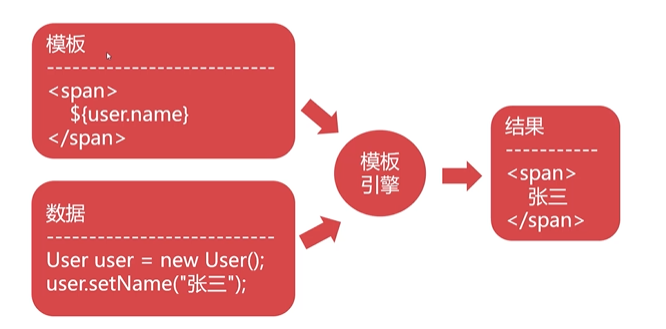
那其实我们的Jsp,就是一个模板引擎,在Jsp中,我们可以使用EL表达式输出数据。但是,也要注意一下在Java Web领域,前端页面的展示不仅仅有Jsp这一种实现方案。比如我们可以想这样一个问题,我们可以在HTML文件中使用EL表达式和JSTL吗?显然这是不可以的,这时候如果想要在页面上更有效更方便的展示数据,就需要其他模板引擎了。
**主流模板引擎**
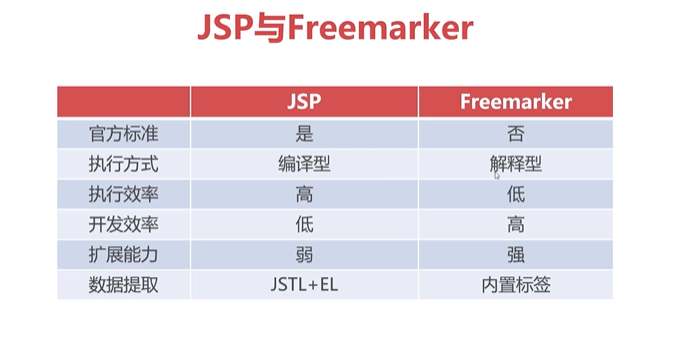
* Java Server Page(Jsp)
* Freemarker(使用历史长,较Jsp更轻量,开发速度更快)
* Beetl(使用量少,融合Jsp和Freemarker,上手更容易,开发速率比之前两个更高)
* Thymeleaf(SpringBoot官方推荐使用模板引擎)
**FreeMarker**
1. Freemarker是免费开源的模板引擎技术
2. Freemarker脚本为Freemarker Template Language(主要工作)
3. Freemarker提供了大量的内建函数来简化开发
## FreeMarker的下载与使用
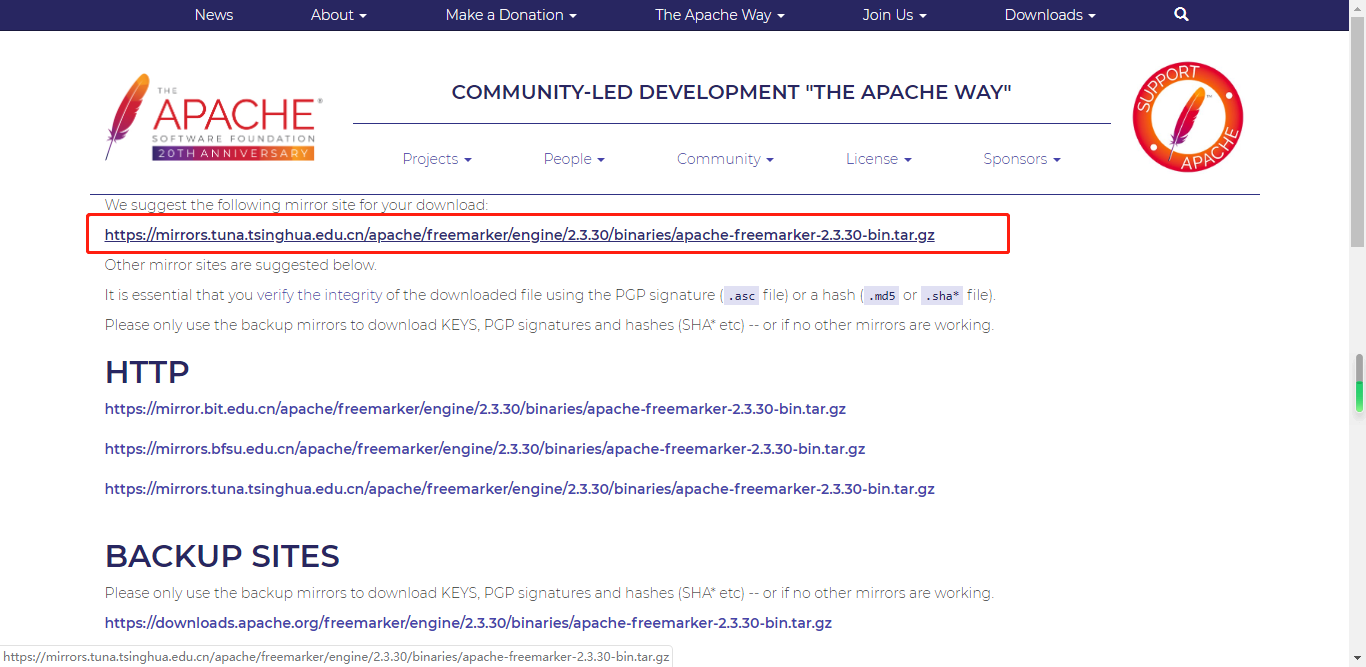
FreeMarker官网:[https://freemarker.apache.org](https://freemarker.apache.org/)
**下载**
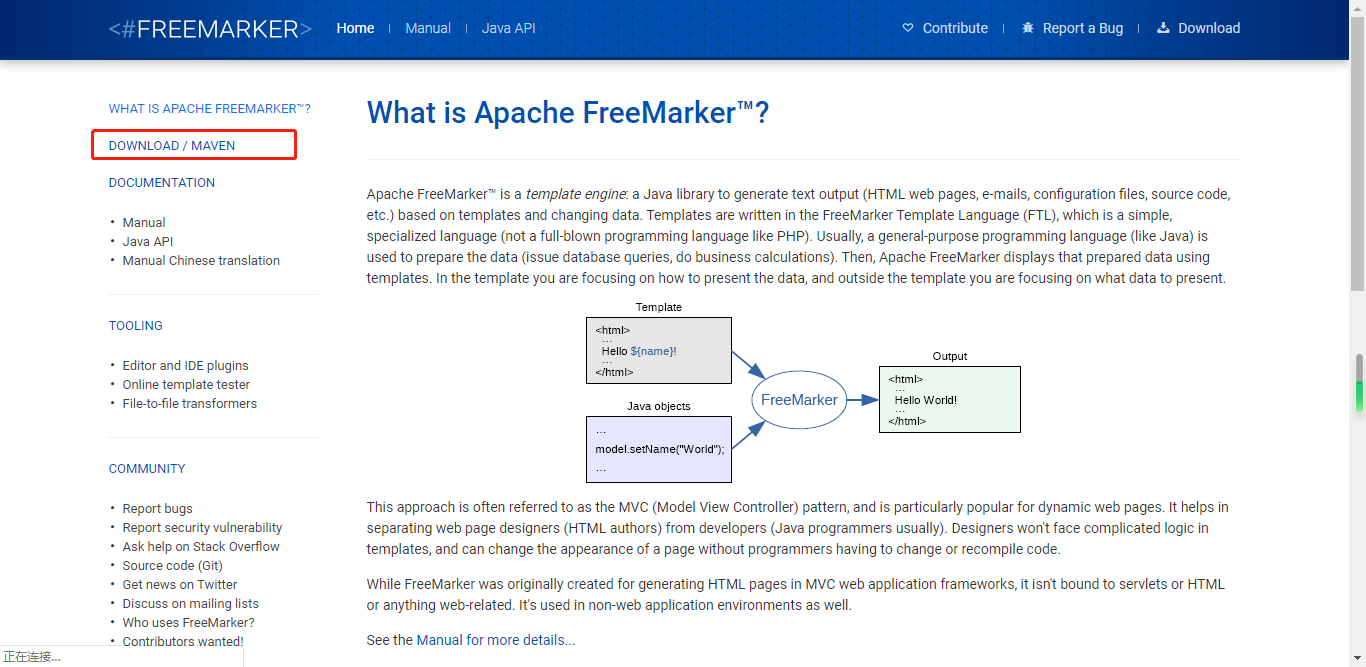
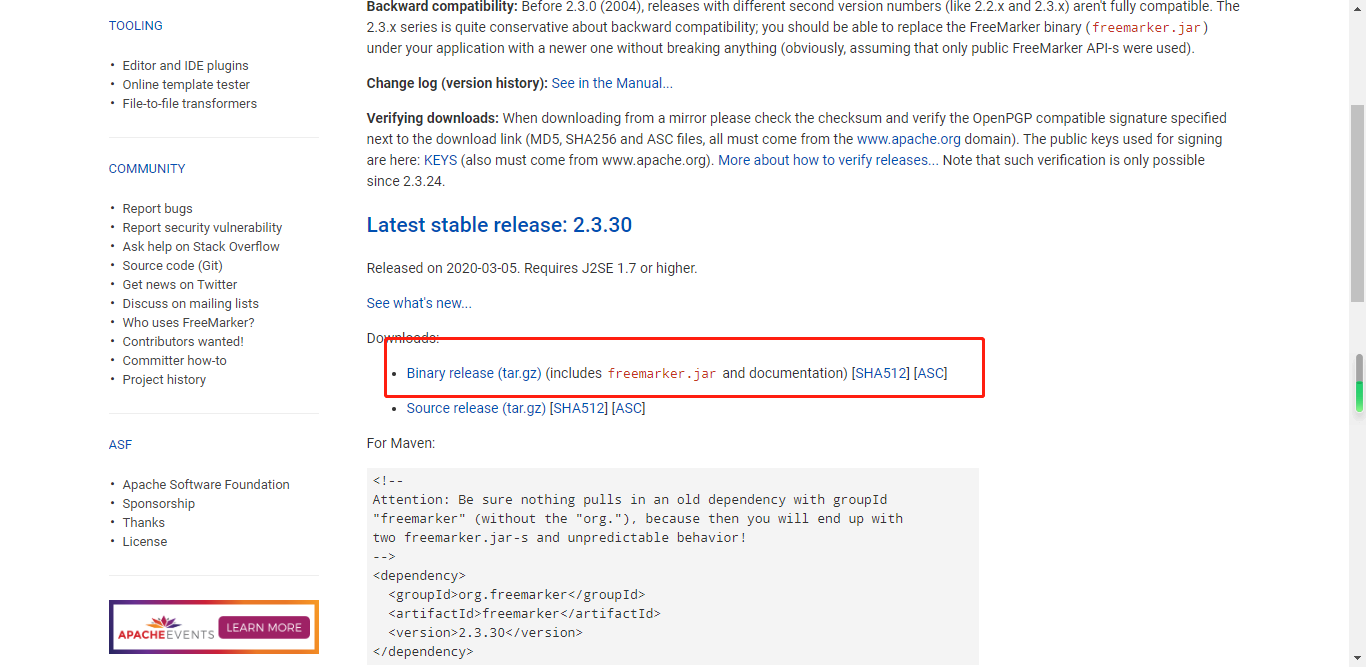
选择手动下载
**使用**
创建Java Project,导入Jar包,并完成Jar包加载进项目
1. 创建模板加载和数据设置文件
~~~
public class FreemarkerSample1 {
public static void main(String[] args) throws TemplateNotFoundException, MalformedTemplateNameException, ParseException, IOException, TemplateException {
//1. 加载模板
//创建核心配置对象,每个不同的版本FreeMarker的语法都有所不同
Configuration config = new Configuration(Configuration.VERSION_2_3_30);
//设置加载的目录,这个空字符串代表当前包(即不指定具体包)。
//在FreemarkerSample1类所在的包中加载指定的ftl文件
config.setClassForTemplateLoading(FreemarkerSample1.class, "");
//得到模板对象
Template t = config.getTemplate("sample1.ftl");
//2. 创建数据
Map<String,Object> data = new HashMap<String,Object>();
data.put("site", "新浪");
data.put("url", "http://www.sina.com");
//3. 产生输出
//此处指定模板对象规范数据以后,具体输出位置为控制台
t.process(data, new OutputStreamWriter(System.out));
}
}
~~~
2. 创建数据模板文件-ftl
~~~ftl
<#-- 采用类似于el表达式的方式去除map中key所对应的值 -->
${site}-${url}
~~~
设想一下,前端工程师编写ftl脚本交给Java工程师,Java工程师就可以利用脚本模板与数据进行结合,将数据代入到对应的模板中,最后按照指定位置进行输出就可以了。
## FreeMarker基本语法
### ftl取值
~~~
${属性名} 取值
${属性名!默认值}
${属性名?string()} 格式化输出
~~~
~~~
public class Computer {
private String sn; //序列号
private String model; //型号
private int state; //状态 1-在用 2-闲置 3-报废
private String user; //使用人
private Date dop; //采购日期
private Float price; //购买价格
private Map info; //电脑配置信息
public Computer() {
}
public Computer(String sn, String model, int state, String user, Date dop, Float price, Map info) {
super();
this.sn = sn;
this.model = model;
this.state = state;
this.user = user;
this.dop = dop;
this.price = price;
this.info = info;
}
public String getSn() {
return sn;
}
public void setSn(String sn) {
this.sn = sn;
}
public String getModel() {
return model;
}
public void setModel(String model) {
this.model = model;
}
public int getState() {
return state;
}
public void setState(int state) {
this.state = state;
}
public String getUser() {
return user;
}
public void setUser(String user) {
this.user = user;
}
public Date getDop() {
return dop;
}
public void setDop(Date dop) {
this.dop = dop;
}
public Float getPrice() {
return price;
}
public void setPrice(Float price) {
this.price = price;
}
public Map getInfo() {
return info;
}
public void setInfo(Map info) {
this.info = info;
}
}
~~~
~~~
public class FreemarkerSample1 {
public static void main(String[] args) throws TemplateNotFoundException, MalformedTemplateNameException, ParseException, IOException, TemplateException {
//1. 加载模板
//创建核心配置对象,每个不同的版本FreeMarker的语法都有所不同
Configuration config = new Configuration(Configuration.VERSION_2_3_30);
//设置加载的目录,这个空字符串代表当前包(即不指定具体包)。
//在FreemarkerSample1类所在的包中加载指定的ftl文件
config.setClassForTemplateLoading(FreemarkerSample1.class, "");
//得到模板对象
Template t = config.getTemplate("sample1.ftl");
//2. 创建数据
Map<String,Object> data = new HashMap<String,Object>();
data.put("site", "新浪");
data.put("url", "http://www.sina.com");
data.put("date", new Date());
data.put("number", 837183.883217);
Map info = new HashMap();
info.put("cpu", "i5");
Computer c1 = new Computer("1234567" , "ThinkPad" , 1 , "李四" , new Date() , 12900f , info);
data.put("computer", c1);
//3. 产生输出
//此处指定模板对象规范数据以后,具体输出位置为控制台
t.process(data, new OutputStreamWriter(System.out));
}
}
~~~
~~~ftl
<#-- Freemarker取值 -->
${site}
${url}
<#-- !设置默认值,防止属性不存在报错 -->
${author!"不存在的属性"}
<#-- ?string格式化输出 -->
${date?string("yyyy年MM月dd日 HH:mm:ss SSS")}
<#-- 数字输出的时候 FreeMarker默认会保留3位小数 并且3位一逗号 -->
${number?string("0.00")}
<#-- Freemarker对象输出 -->
SN:${computer.sn}
型号:${computer.model}
状态:${computer.state}
用户:${computer.user}
<#-- 日期对象无法直接输出 -->
采购时间:${computer.dop?string("yyyy年MM月dd日")}
采购价格:${computer.price?string("0.00")}
配置信息:
-----------
CPU:${computer.info["cpu"]}
内存:${computer.info["memory"]!"无内存信息"}
~~~
### 分支判断
freeMarker中使用`<if>`,`<switch>`标签进行分支判断
~~~
<#-- Freemarker取值 -->
${site}
${url}
<#-- !设置默认值,防止属性不存在报错 -->
${author!"不存在的属性"}
<#-- ?string格式化输出 -->
${date?string("yyyy年MM月dd日 HH:mm:ss SSS")}
<#-- 数字输出的时候 FreeMarker默认会保留3位小数 并且3位一逗号 -->
${number?string("0.00")}
<#-- ftl中判断字符串可以直接使用==,在if标签中不需要使用${}进行取值 -->
<#if computer.sn == "1234567">
重要设备
</#if>
SN:${computer.sn}
型号:${computer.model}
<#if computer.state == 1>
状态:正在使用
<#elseif computer.state == 2>
状态:闲置
<#elseif computer.state == 3>
状态:已作废
</#if>
<#switch computer.state>
<#case 1>
状态:正在使用
<#break>
<#case 2>
状态:闲置
<#break>
<#case 3>
状态:已作废
<#break>
<#default>
状态:无效状态
</#switch>
<#-- ??代表判断对象是否为空,true不为空,false为空 -->
<#if computer.user??>
用户:${computer.user}
</#if>
采购时间:${computer.dop?string("yyyy年MM月dd日")}
采购价格:${computer.price?string("0.00")}
配置信息:
--------------
CPU:${computer.info["cpu"]}
内存:${computer.info["memory"]!"无内存信息"}
~~~
### 迭代
~~~
public class FreemarkerSample2 {
public static void main(String[] args) throws TemplateNotFoundException, MalformedTemplateNameException, ParseException, IOException, TemplateException {
//1. 加载模板
//创建核心配置对象
Configuration config = new Configuration(Configuration.VERSION_2_3_28);
//设置加载的目录
config.setClassForTemplateLoading(FreemarkerSample2.class, "");
//得到模板对象
Template t = config.getTemplate("sample2.ftl");
//2. 创建数据
Map<String,Object> data = new HashMap<String,Object>();
List<Computer> computers = new ArrayList();
computers.add(new Computer("1234567" , "ThinkPad X1" , 2 , null , new Date() , 12999f , new HashMap() ));
computers.add(new Computer("1234568" , "HP XXX" , 1 , "张三" , new Date() , 7500f , new HashMap() ));
computers.add(new Computer("1234569" , "DELL XXX" , 3 , "李四" , new Date() , 8500f , new HashMap() ));
computers.add(new Computer("1234570" , "ACER XXX" , 1 , "王五" , new Date() , 6300f , new HashMap() ));
computers.add(new Computer("1234571" , "MSI XXX" , 1 , "赵六" , new Date() , 9300f , new HashMap() ));
data.put("computers", computers);
//LinkedHashMap可以保证数据按存放顺序进行提取
Map computerMap = new LinkedHashMap();
for(Computer c : computers) {
computerMap.put(c.getSn(), c);
}
data.put("computer_map", computerMap);
//3. 产生输出
t.process(data, new OutputStreamWriter(System.out));
}
}
~~~
~~~
<#-- 迭代List -->
<#-- 此处将c作为每次迭代的迭代变量 -->
<#list computers as c>
序号:${c_index + 1} <#-- 迭代变量_index保存了循环的索引,从0开始 -->
SN:${c.sn}
型号:${c.model}
<#switch c.state>
<#case 1>
状态:使用中
<#break>
<#case 2>
状态:闲置
<#break>
<#case 3>
状态:已作废
<#break>
</#switch>
<#if c.user??>
用户:${c.user}
</#if>
采购日期:${c.dop?string("yyyy-MM-dd")}
采购价格:${c.price?string("0.00")}
-------------------------------------------
</#list>
<#-- 迭代Map -->
==========================================
<#-- ?keys代表获取map中所有的key值 -->
<#list computer_map?keys as k >
${k}-${computer_map[k].model}
${computer_map[k].price?string("0.00")}
</#list>
~~~
## FreeMarker内建函数
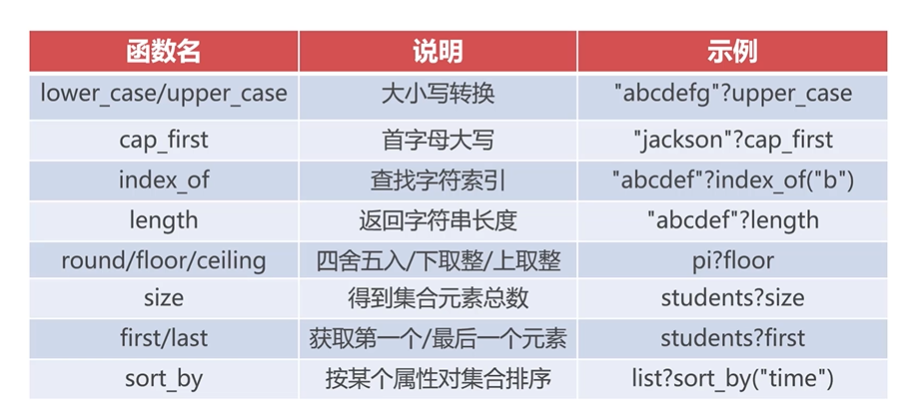
FreeMarker提供了大量的内建函数,这些内建函数可以简化我们的开发。
~~~
public class FreemarkerSample3 {
public static void main(String[] args) throws TemplateNotFoundException, MalformedTemplateNameException, ParseException, IOException, TemplateException {
//1. 加载模板
//创建核心配置对象
Configuration config = new Configuration(Configuration.VERSION_2_3_28);
//设置加载的目录
config.setClassForTemplateLoading(FreemarkerSample3.class, "");
//得到模板对象
Template t = config.getTemplate("sample3.ftl");
//2. 创建数据
Map<String,Object> data = new HashMap<String,Object>();
data.put("name", "jackson");
data.put("brand", "bmw");
data.put("words", "first blood");
data.put("n", 37981.83);
data.put("date", new Date());
List<Computer> computers = new ArrayList();
computers.add(new Computer("1234567" , "ThinkPad X1" , 2 , null , new Date() , 12999f , new HashMap() ));
computers.add(new Computer("1234568" , "HP XXX" , 1 , "张三" , new Date() , 7500f , new HashMap() ));
computers.add(new Computer("1234569" , "DELL XXX" , 3 , "李四" , new Date() , 8500f , new HashMap() ));
computers.add(new Computer("1234570" , "ACER XXX" , 1 , "王五" , new Date() , 6300f , new HashMap() ));
computers.add(new Computer("1234571" , "MSI XXX" , 1 , "赵六" , new Date() , 9300f , new HashMap() ));
data.put("computers", computers);
//3. 产生输出
t.process(data, new OutputStreamWriter(System.out));
}
}
~~~
~~~
${name?cap_first}
${brand?upper_case}
${brand?length}
${words?replace("blood" , "*****")}
${words?index_of("blood")}
<#-- 利用?string实现三目运算符的操作 -->
${(words?index_of("blood") != -1)?string("包含敏感词汇","不包含敏感词汇")}
${n?round}
${n?floor}
${n?ceiling}
公司共有${computers?size}台电脑
第一台:${computers?first.model}
最后一台:${computers?last.model}
<#-- sort_by默认升序排列,利用reverse(反转)可以实现降序排列 -->
<#list computers?sort_by("price")?reverse as c>
${c.sn}-${c.price}
</#list>
~~~
FreeMarker中文参考手册网址
http://freemarker.foofun.cn/
## Freemarker与Servlet整合
~~~
<?xml version="1.0" encoding="UTF-8"?>
<web-app xmlns:xsi="http://www.w3.org/2001/XMLSchema-instance" xmlns="http://xmlns.jcp.org/xml/ns/javaee" xsi:schemaLocation="http://xmlns.jcp.org/xml/ns/javaee http://xmlns.jcp.org/xml/ns/javaee/web-app_3_1.xsd" id="WebApp_ID" version="3.1">
<display-name>fm-web</display-name>
<welcome-file-list>
<welcome-file>index.html</welcome-file>
<welcome-file>index.htm</welcome-file>
<welcome-file>index.jsp</welcome-file>
<welcome-file>default.html</welcome-file>
<welcome-file>default.htm</welcome-file>
<welcome-file>default.jsp</welcome-file>
</welcome-file-list>
<!-- 为了使FreeMarker能够与Web项目相结合,需要对Freemarker的核心类FreemarkerServlet进行配置 -->
<servlet>
<servlet-name>freemarker</servlet-name>
<servlet-class>freemarker.ext.servlet.FreemarkerServlet</servlet-class>
<!-- 设置ftl文件的加载地址,限制ftl文件存放位置 -->
<init-param>
<param-name>TemplatePath</param-name>
<param-value>/WEB-INF/ftl</param-value>
</init-param>
</servlet>
<servlet-mapping>
<servlet-name>freemarker</servlet-name>
<!-- 该路径指的是如果浏览器中输入的是.ftl结尾的路径,就会交由FreemarkerServlet进行处理,这也避免了web-inf目录下资源不可直接通过浏览器访问的机制 -->
<url-pattern>*.ftl</url-pattern>
</servlet-mapping>
</web-app>
~~~
~~~
<!DOCTYPE html>
<html>
<head>
<meta charset="UTF-8">
<meta name="viewport" content="width=device-width,initial-scale=1">
<title>员工列表</title>
<link href="css/bootstrap.css" type="text/css" rel="stylesheet"></link>
<script type="text/javascript" src="js/jquery-1.11.1.min.js"></script>
<script type="text/javascript" src="js/bootstrap.js"></script>
<style type="text/css">
.pagination {
margin: 0px
}
.pagination > li > a, .pagination > li > span {
margin: 0 5px;
border: 1px solid #dddddd;
}
.glyphicon {
margin-right: 3px;
}
.form-control[readonly] {
cursor: pointer;
background-color: white;
}
#dlgPhoto .modal-body{
text-align: center;
}
.preview{
max-width: 500px;
}
</style>
</head>
<body>
<div class="container">
<div class="row">
<h1 style="text-align: center">dodoke员工信息表</h1>
<div class="panel panel-default">
<div class="clearfix panel-heading ">
<div class="input-group" style="width: 500px;">
</div>
</div>
<table class="table table-bordered table-hover">
<thead>
<tr>
<th>序号</th>
<th>员工编号</th>
<th>姓名</th>
<th>部门</th>
<th>职务</th>
<th>工资</th>
<th> </th>
</tr>
</thead>
<tbody>
<#list employee_list as emp>
<tr>
<td>${emp_index + 1}</td>
<td>${emp.empno?string("0")}</td>
<td>${emp.ename}</td>
<td>${emp.department}</td>
<td>${emp.job}</td>
<td style="color: red;font-weight: bold">¥${emp.salary?string("0.00")}</td>
</tr>
</#list>
</tbody>
</table>
</div>
</div>
</div>
</body>
</html>
~~~
~~~
public class Employee {
private Integer empno;
private String ename;
private String department;
private String job;
private Float salary;
public Employee() {
}
public Employee(Integer empno, String ename, String department, String job, Float salary) {
super();
this.empno = empno;
this.ename = ename;
this.department = department;
this.job = job;
this.salary = salary;
}
public Integer getEmpno() {
return empno;
}
public void setEmpno(Integer empno) {
this.empno = empno;
}
public String getEname() {
return ename;
}
public void setEname(String ename) {
this.ename = ename;
}
public String getDepartment() {
return department;
}
public void setDepartment(String department) {
this.department = department;
}
public String getJob() {
return job;
}
public void setJob(String job) {
this.job = job;
}
public Float getSalary() {
return salary;
}
public void setSalary(Float salary) {
this.salary = salary;
}
}
~~~
~~~
@WebServlet("/list")
public class ListServlet extends HttpServlet {
private static final long serialVersionUID = 1L;
public ListServlet() {
super();
}
protected void doGet(HttpServletRequest request, HttpServletResponse response) throws ServletException, IOException {
List list = new ArrayList();
list.add(new Employee(7731,"张三" , "市场部" , "客户代表" , 8000f));
list.add(new Employee(8871,"李四" , "研发部" , "运维工程师" , 7000f));
request.getServletContext().setAttribute("employee_list", list);
request.getRequestDispatcher("/employee.ftl").forward(request, response);
}
}
~~~
配置FreeMarker后,可以将保存数据的集合或列表放在context、session、request的属性里,在 . ftl文件里使用时直接写集合或列表的属性名,FreeMarker能够直接找到该数据。
(FreeMarker模板引擎首先会从请求中查找,请求中没有会话中查找,会话中没有在去查找ServletContext应用程序全局,3种都没有才会停止程序执行)