
[TOC]
[文档](https://help.aliyun.com/zh/oss/developer-reference/?spm=a2c4g.11186623.0.0.78a725f5fh6Ojs)
[登录地址](https://account.aliyun.com/login/login.htm?oauth_callback=https://oss.console.aliyun.com/index)
## 1、可选[创建资源组](https://resourcemanager.console.aliyun.com/resource-groups)
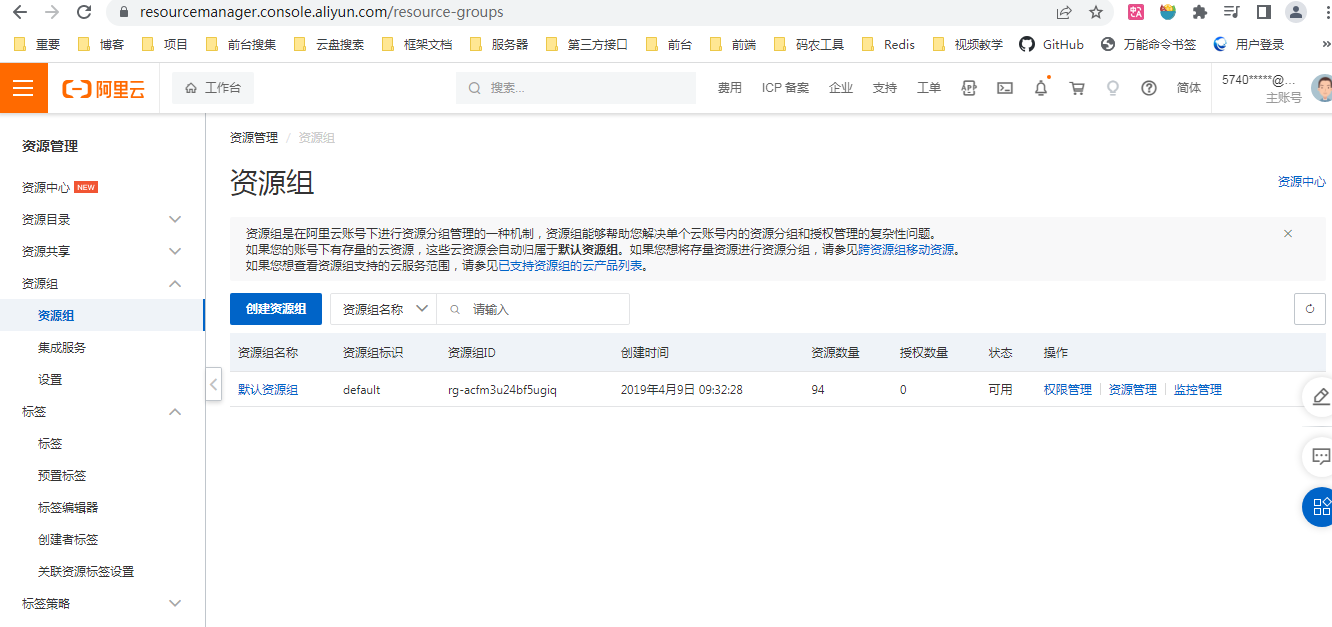
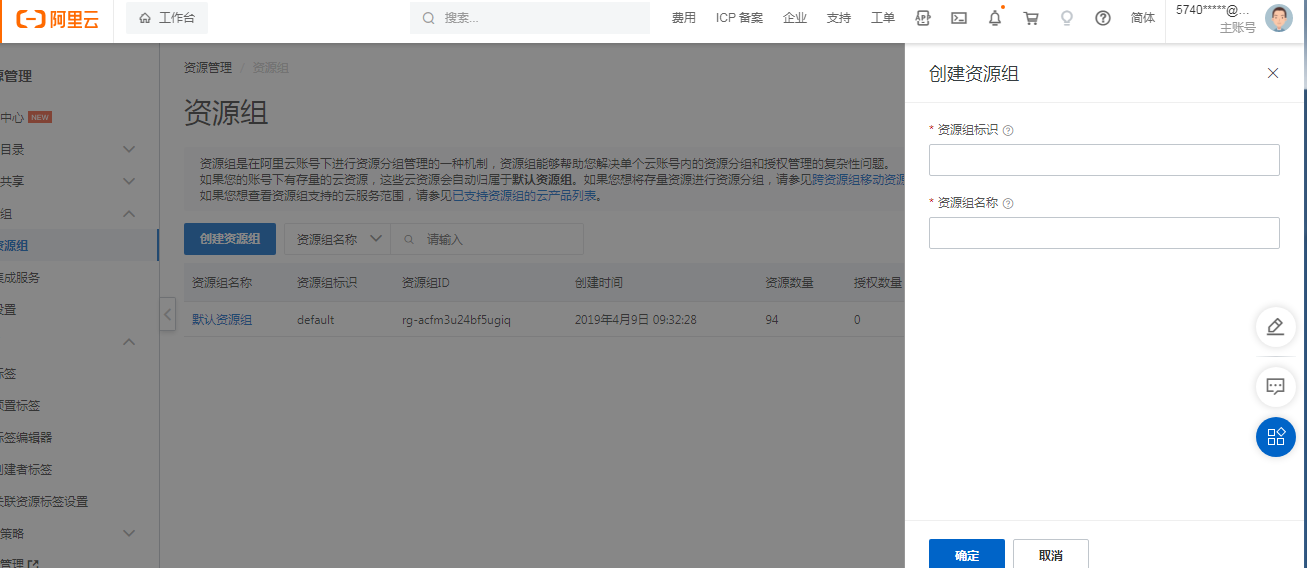
## 2、[创建Bucket](https://oss.console.aliyun.com/bucket)
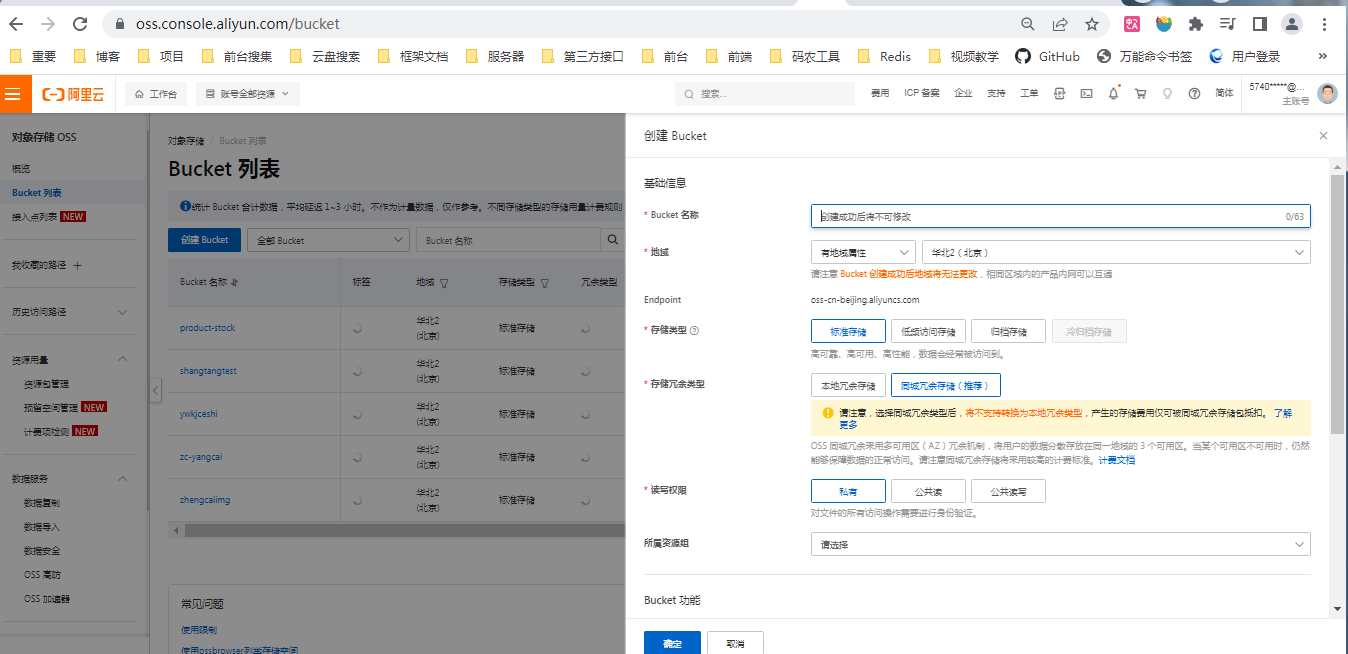
### **读写权限:**
(1)私有:对object的所有访问操作需要进行身份验证。就是普通用户或其他用户没有经过认证,它是访问不了的。
(2)公共读:对object写操作()需要进行身份验证:可以对object进行匿名读。就是其他人可以没有经过认证就去读,访问bucket资源,没有写的权限。
(3)公共读写:所有人都可以对object进行读写操作。
选择私有权限,点击提交,在列表里就可以看见创建完的bucket。
新建bucketName(需要全局唯一)。
### **存储冗余类型 [说明](https://aliyun.cloudduo.cn/oss_zrs_lrs.html)**
* 同城冗余ZRS(0.15元/GB/月):将您的数据冗余存储在同**一个区域的多个可用区**,可支持单个可用区(机房)整体故障时(如断电、火灾等),仍维持数据不丢失,可正常访问。
* 本地冗余LRS(0.12元/GB/月):将您的数据冗余存储在同**一个可用区的不同存储设备上**,可支持两个存储设备并发损坏时,仍维持数据不丢失,可正常访问。
### **读写权限**
public-read-write,public-read和private
常见问题小结
(1)bucket设置为私有,能否防止恶意下载
不能防止,一但对应资源的签名url对外暴露,在签名url有效期内就可以通过签名url下载对应的资源。
(2)bucket私有,获取到的资源链接是否具有时效性
有时效性,一但过期就不可被访问。
(3)获取到的资源链接是否可以永久有效
将bucket改为公共读/公共读写,获取到的object链接一般都是永久有效的,但是如果bucket私有则一般获取的链接是有时效的。
## **控制台上传**
1、新建文件夹(区分大小写)
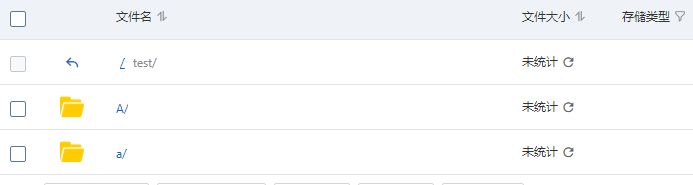
2、找test目录点击上传文件比如我么上传选择B文件夹那么他会将B文件和里面的子文件等都上传上去(一次最多10000文件并且最大不来了个超过5G)
## **准备**
1、创建用户:
身份管理-创建用户:此步骤需要手机验证
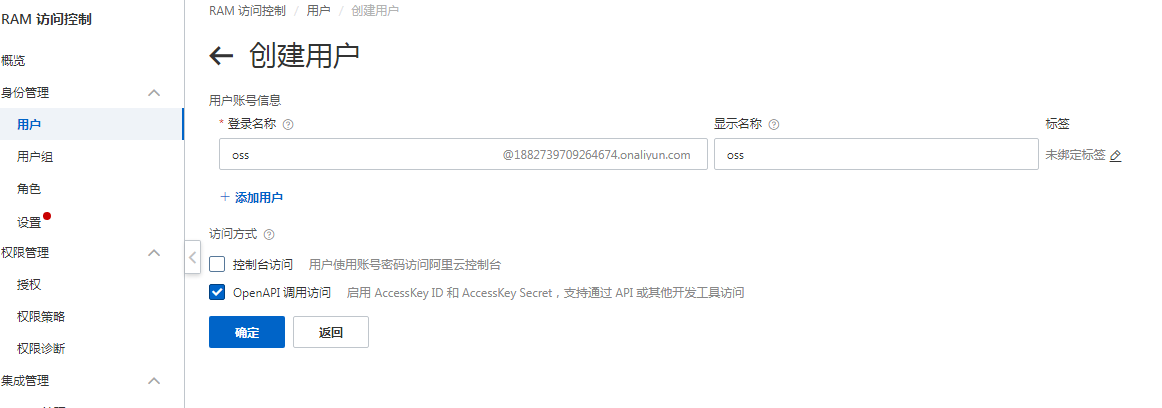
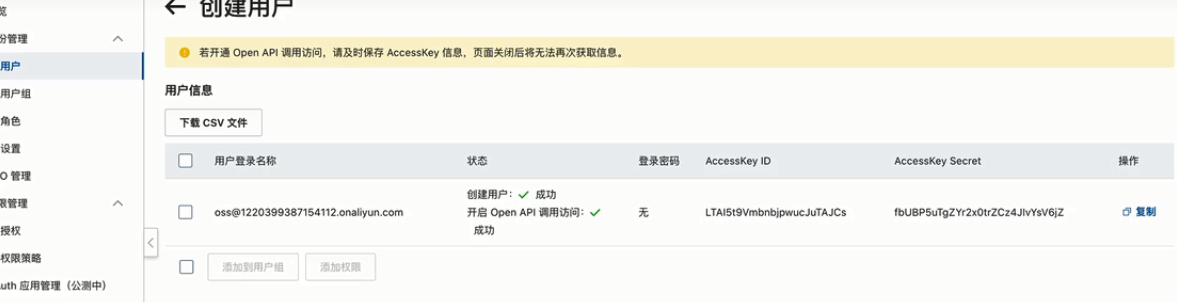
保存好AccessKeyID和AccessKey secret (secret_key,这个只显示一次,后续不会在出现)
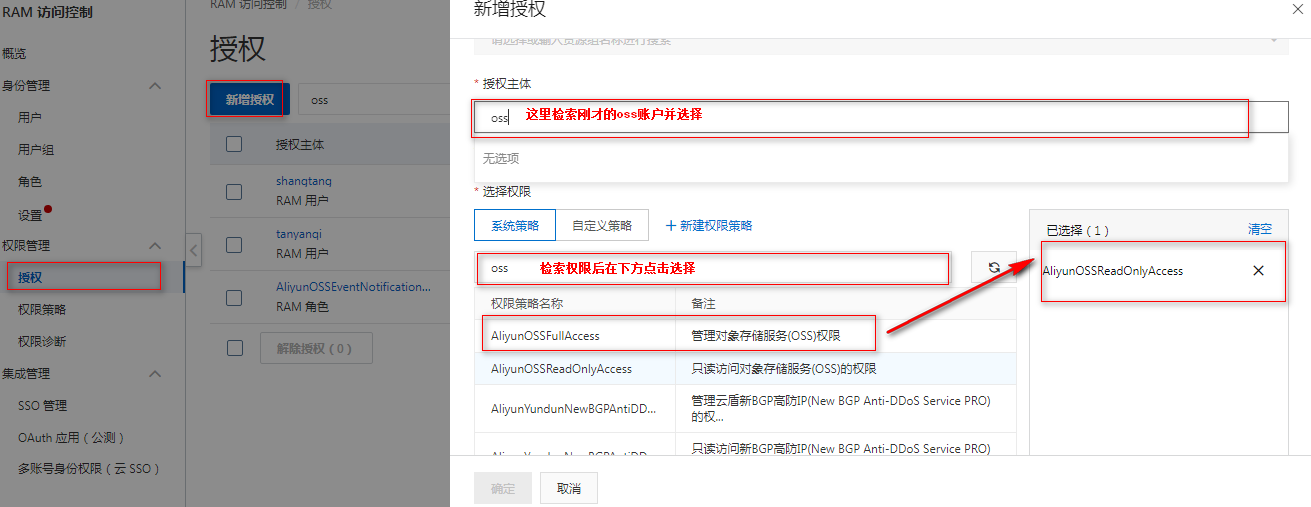
授予该用户 AliyunOSSFullAccess系统策略管理对象存储服务(OSS)权限
2、拿到该用户的信息
* AccessKeyID
* AccessKey secret
* endpoint:oss-cn-beijing.aliyuncs.com [访问域名和数据中心](https://help.aliyun.com/zh/oss/user-guide/regions-and-endpoints#concept-zt4-cvy-5db)获取(注意前面加上http://或者htps://,想要那个协议加上对应的)

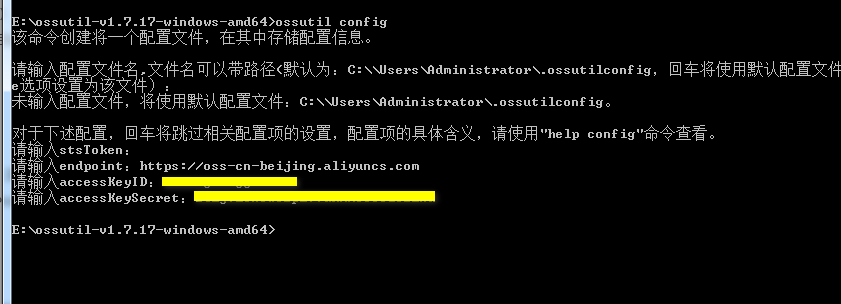
根据提示分别设置Endpoint、AccessKey ID、AccessKey Secret和STSToken参数。
| **参数**| **说明**|
| --- | --- |
| endpoint| 填写Bucket所在地域的Endpoint。关于各地域Endpoint的更多信息,请参见[访问域名和数据中心](https://help.aliyun.com/zh/oss/user-guide/regions-and-endpoints#concept-zt4-cvy-5db)。<br>您也可以增加`http://`或`https://`指定ossutil访问OSS使用的协议,默认使用HTTP协议。例如,使用HTTPS协议访问华东1(杭州)的Bucket,设置为`https://oss-cn-hangzhou.aliyuncs.com`。|
| accessKeyID| 填写账号的AccessKey。<br>* 使用阿里云账号或RAM用户访问时,AccessKey的获取方式,请参见[创建AccessKey](https://help.aliyun.com/document_detail/53045.html#task968)。<br>* 使用STS临时授权账号访问时,AccessKey的获取方式,请参见[使用STS临时访问凭证访问OSS](https://help.aliyun.com/zh/oss/developer-reference/use-temporary-access-credentials-provided-by-sts-to-access-oss#concept-xzh-nzk-2gb)。|
| accessKeySecret|
| stsToken|使用STS临时授权账号访问OSS时需要配置该项,否则置空即可。关于stsToken的生成方式,请参见[临时访问凭证](https://help.aliyun.com/zh/oss/user-guide/authorized-third-party-upload#section-dvv-hkb-5db)。 |
**说明**
关于配置文件的更多信息,请参见[config](https://help.aliyun.com/zh/oss/developer-reference/config#concept-303826)。
[对象存储OSS](https://help.aliyun.com/zh/oss/developer-reference/common-tools/?spm=a2c4g.11186623.0.0.61c528c43Xxa5Z)>[开发参考](https://help.aliyun.com/zh/oss/developer-reference/?spm=a2c4g.11186623.0.0.710e94e0a4iI01)>[常用工具](https://help.aliyun.com/zh/oss/developer-reference/common-tools/?spm=a2c4g.11186623.0.0.57bd2435fkRmBl)>[# 命令行工具ossutil](https://help.aliyun.com/zh/oss/developer-reference/ossutil-1/?spm=a2c4g.11186623.0.0.29d32ef5LcfHd3)
## **下载**[**ossutil**](https:help.aliyun.com/zh/oss/developer-reference/install-ossutil?spm=a2c4g.207217.0.i0#concept-303829)**Tools**
运行ossutil.bat
Extract the tool and double-click to run the ossutil.bat file
### **配置**
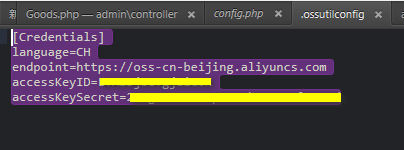
### **验证是否已成功安装ossutil。**
Enter ossutil to verify success, a black window displays many commands and explains success
```
Commands:
mb cloud_url [options]
Create a bucket
ls [cloud_url] [options]
List buckets or objects
rm cloud_url [options]
Delete buckets or objects
stat cloud_url [options]
Displays the description of the bucket or object
set-acl cloud_url [acl] [options]
Set ACLs for buckets or objects
set-meta cloud_url [meta] [options]
Set the meta information of the uploaded objects
cp src_url dest_url [options]
Upload, download or copy Objects
restore cloud_url [local_xml_file] [options]
Objects restored to a frozen state are readable
create-symlink cloud_url target_url [options]
Create a symbolic link
read-symlink cloud_url [options]
Read the description of the symbolic link file
sign cloud_url [meta] [options]
Generate an object download link
probe file_name [options]
Probe command, support a variety of function detection
mkdir dir_name [options]
Create a directory whose name has the suffix '/' in OSS
cors bucket_url [local_xml_file] [options]
Configure, query, or delete the CORS configuration of a bucket
logging src_bucket_url target_bucket_url [options]
Configure, query, or delete the log configuration of a bucket
referer bucket_url referer [options]
Set, query, or delete the referer configuration of a bucket
listpart oss_object uploadid [options]
Lists the chunk information of objects that have not completed the chunked upload
getallpartsize bucket_url [options]
Obtain the chunk size and sum of all incomplete multipart objects uploaded to the bucket
appendfromfile local_file_name oss_object [options]
Upload the local file content to the Appendable Object in OSS by append
cat object [options]
Outputs the contents of the file to standard output
bucket-tagging bucket_url [tag_parameter] [options]
Configure, query, or delete the tag configuration of a bucket
bucket-encryption bucket_url [options]
Set, query, or delete the encryption configuration of a bucket
cors-options oss_url [options]
Send HTTP options requests to OSS for CORS detection
style bucket_url [local_xml_file] [style_name] [options]
Add, query, delete, or list image styles for buckets
lifecycle bucket_url local_xml_file [options]
Configure, query, or delete the lifecycle configuration of a bucket
website bucket_url local_xml_file [options]
Configure, query, or delete the website configuration of a bucket
bucket-qos bucket_url [local_xml_file] [options]
Configure, query, or delete the QoS configuration of a bucket
user-qos [local_file] [options]
Query the QoS configuration of the user
bucket-versioning bucket_url [versioning_parameter] [options]
Set and query the versioning configuration of the bucket
du bucket_url [options]
Obtain the amount of bucket or the amount of storage occupied by a specified prefix (directory).
bucket-policy bucket_url [local_json_file] [options]
Configure, query, or delete the bucket's policy configuration
request-payment bucket_url [payment_parameter] [options]
Configure and query the visitor payment configuration of the bucket
object-tagging cloud_url [tag_parameter] [options]
Set, query, or delete the tag configuration of an object
inventory bucket_url [local_xml_file] [id] [options]
Add, query, delete, or list bucket configurations
revert-versioning cloud_url [options]
Reverts an object from a deleted state to a recent multi-version state
sync src dest [options]
Synchronize local file directories or OSS Prefix from the source to the destination
worm command_name bucket_url [days] [wormId] [options]
Configure, delete, modify, and commit the Worm configuration of a bucket
lrb [conf_file] [options]
List buckets in a region
replication bucket_url [local_xml_file|ruleID] [options]
Cross-region synchronization configuration management of buckets
bucket-cname bucket_url [options]
Manage bucket cname and cname token configuration
lcb [options]
List cloud box information
access-monitor bucket_url local_xml_file [options]
Set and query the access monitor configuration of the bucket
resource-group bucket_url local_xml_file [options]
Set and query the resource group configuration of the bucket
Additional Commands:
help [command]
Gets help documentation for the command
config [options]
Create a configuration file to store configuration items
hash file_url [options]
Calculate the CRC64 or MD5 of the local file
update [options]
更新ossutil
```
### **操作**
### **上传**[(文档链接)](https://help.aliyun.com/zh/oss/developer-reference/upload-objects-6?spm=a2c4g.11186623.0.0.55e143a3peLdxV)
示例说明如下:
* 本地文件:examplefile.txt(根目录下的文件)
* 本地文件夹:localfolder(根目录下的文件夹)
* 目标Bucket:examplebucket
* 目标Bucket指定目录:desfolder
ossutil支持将本地文件上传到OSS,示例如下:
* 上传单个文件
上传文件时,如果不指定上传至OSS的文件名,则默认使用原文件名进行保存;如果指定文件名,则按照指定的文件名保存在OSS中。
~~~bash
./ossutil64 cp examplefile.txt oss://examplebucket/desfolder/
~~~
* 仅上传文件夹内的文件
使用cp命令时增加\-r选项,可以只将本地文件夹内的文件上传到OSS指定路径。
~~~bash
./ossutil64 cp -r localfolder/ oss://examplebucket/desfolder/
~~~
>[danger]window同理,ossutil64和ossutil.bat在同一文件夹下,我们打开ossutil.bat则无需在指定绝对路径而是直接`ossutil64 cp -r localfolder/ oss://examplebucket/desfolder/`否则需要指定完整的执行文件路径`E:\ossutil-v1.7.17-windows-amd64.exe cp -r localfolder/ oss://examplebucket/desfolder/`
* 上传文件夹及文件夹内的文件
使用cp命令时增加\-r选项,并在OSS指定路径下添加本地文件夹名称,可以将本地文件夹以及文件夹内的文件上传到OSS指定路径。
~~~bash
./ossutil64 cp -r localfolder/ oss://examplebucket/desfolder/localfolder/
~~~
>[danger]windows系统将J:\BaiduNetdiskDownload\Media\Oimages\hello\ 文件夹下的内容上传到名字叫ava的Bucket下的test/目录下
```
ossutil64 cp -r J:\BaiduNetdiskDownload\Media\Oimages\hello\ oss://ava/test/hello/
```
J:\BaiduNetdiskDownload\Media\Oimages\K\ 文件夹下的内容上传到名字叫ava的Bucket的根目录下
```
ossutil64 cp -r J:\BaiduNetdiskDownload\Media\Oimages\K\ oss://aviva/K/
```
* 上传单个文件并指定\--meta选项
上传文件的同时可以使用\--meta选项设置文件的meta信息,其内容格式为`header:value#header:value...`。
~~~bash
./ossutil64 cp examplefile.txt oss://examplebucket/desfolder/examplefile.txt --meta=Cache-Control:no-cache#Content-Encoding:gzip
~~~
* 上传文件夹并跳过已有文件
批量上传失败重传时,可以指定\--update(可缩写为\-u)选项跳过已经上传成功的文件,实现增量上传。示例如下:
~~~bash
./ossutil64 cp -r localfolder/ oss://examplebucket/desfolder/ -u
~~~
* 上传文件到开通了请求者付费模式的Bucket
~~~bash
./ossutil64 cp localfolder/examplefile.txt oss://examplebucket/ --payer=requester
~~~
* 仅上传当前目录下的文件,忽略子目录
~~~bash
./ossutil64 cp localfolder/ oss://examplebucket/desfolder/ --only-current-dir -r
~~~
* 上传时不为目录生成Object
OSS的目录是用一个0 KB大小,名称以正斜线(/)结尾的Object模拟的。上传时增加\--disable-dir-object参数,ossutil不会为该目录生成Object,但您仍可以在OSS控制台看到对应的目录结构。当您删除目录内的文件时,该目录也会消失。
~~~bash
./ossutil64 cp localfolder/ oss://examplebucket/desfolder/ --disable-dir-object -r
~~~
* 上传软链接子目录下的文件
~~~bash
./ossutil64 cp localfolder/ oss://examplebucket/desfolder/ --enable-symlink-dir -r
~~~
* 上传时忽略所有的软链接子文件以及软链接子目录
~~~bash
./ossutil64 cp localfolder/ oss://examplebucket/desfolder/ -r --disable-all-symlink
~~~
- php更新内容
- PHP PSR 标准规范
- 辅助查询(*)
- 实用小函数
- composer项目的创建
- composer安装及设置
- composer自动加载讲解
- phpsdudy的composer操作
- 更换compoer镜像源
- 下载包与删除包
- git
- 安装以及配置公钥
- 手动添加Git Bash Here到右键菜单
- 第一次使用git要配置github远程仓库
- 代码上传到gitee
- Git代码同时上传到GitHub和Gitee(码云)
- Git - 多人协同开发利器,团队协作流程规范与注意事项
- 删除远程仓库的文件
- github查询方法
- 错误
- git clean
- 解决github release下载慢的问题
- 其他
- php.ini
- 缓冲函数ob_start()
- php配置可修改范围
- php超时
- 防跨目录设置
- 函数可变参数
- 匿名函数(闭包函数:closures)
- PHP CLI模式开发(命令行开发)
- 【时间】操作
- 常用时间函数
- 时间函数例子
- Date/Time 函数(不包含别名函数)
- DateTime类别名函数
- 【数字】及【数学】操作
- 【字符串】操作
- 常见用法
- 【数组】操作
- 排序
- 合并与累加案例
- 重组
- foreach引用传值注意点
- 判断数组a是否完全属于数组b
- 数组指针操作
- 【正则】
- php正则函数
- 特殊符号
- 模式修正符
- 去除文本中的html、xml的标签
- \r\n
- 分组
- 断言(环视?)
- 条件表达式
- 递归表达式 (?R)
- 固化分组
- 正则例子
- 提取类文件的公共方法
- 抓取网页内容
- 匹配中文字符
- 提取sql日志文件
- 框架
- xpath匹配
- 【文件】操作
- 自动加载spl_autoload_register
- 文件加载
- 文件的上传
- 将字节转为人可读的单位
- 文件上传相关设置
- 常见的mimi类型
- 文件断点续传
- 文件下载(防盗链+大文件+断点续传)
- 破解防盗链
- 即时通讯与php网络相关(websocket,workman,swoole,curl)
- 网络编程基本概念
- socket套接字和streams流
- socket
- 使用websocket实现php消息实时推送完整示例
- streams
- Stream函数实现websocket
- swoole+Workman笔记
- Workman相关
- 启动停止
- Worker
- Connection
- TcpConnection
- AsyncTcpConnection类
- UdpConnection
- AsyncUdpConnection
- Timer
- Autoloader
- 协议(Protocols)
- Http服务
- 响应Response
- session会话
- session管理
- SSE(服务端推送技术)
- websocket
- tcp
- udp
- 其它
- text
- frame
- unix domain
- 定制协议
- workerman协程(workerman>=5.1.0,php>=8.2)
- wokerman实例
- workerman实现微信公众号带参数二维码扫码识别用户
- 服务端和客户端
- workerman其它实例
- Work类
- 设置transport开启ssl,websocket+ssl即wss
- 多端口(多协议)监听
- 详细用法
- 全局的eventloop
- Timer定时器类
- pipeTCP代理
- 事件循环
- workman示例
- 使用workerman实现基于UDP的异步SIP服务器,服务器端可主动发送UDP数据给客户端
- swoole相关
- 安装及常用Cli操作
- TCP
- 4种回调函数的写法
- easyswoole
- 目录结构
- 配置文件
- swoole
- curl封装
- curl参数
- php支持的协议和封装协议(如http,php://input)
- php://协议
- file://协议
- http(s)://协议
- ftp(s)://协议
- zip://, bzip2://, zlib://协议
- data://协议
- glob://协议
- expect://协议
- phar://
- ssh2
- rar://
- ogg://
- 上下文(Context)选项和参数(用于所有的文件系统或数据流封装协议)
- 过滤器
- http请求及模拟登录
- 常用的header头部定义汇总
- HTTP响应头和请求头信息对照表
- HTTP请求的返回值含义说明
- content-type对照表
- Cache-Control对照
- curl函数
- 防止页面刷新
- telnet模拟get、post请求
- 三种方式模拟表单发布留言
- 模拟登陆
- 防盗链
- php+mysql模拟队列发送邮件
- WebSocket JavaScript API
- 进程/线程/协程
- 协程
- 什么是协程
- web通讯(轮询、长连接、websocket)
- 轮询(Event Loop)
- WebSocket
- socket.io(对 WebSocket 的封装)
- 邮件发送
- PHPMailer
- 短信验证码
- 短信宝
- 阿里云短信(新版)
- 短信API
- 原版
- 异常处理
- 显示全部错误
- 异常分类
- php系统异常
- 错误级别
- set_error_handler
- set_exception_handler
- register_shutdown_function
- try catch
- tp5异常处理类解析
- 字符串中的变量解析
- url与文件路径
- empty、isset、is_null
- echo 输出bool值
- if真假情况
- 流程控制代替语法【if (条件): endif;】
- 三元运算
- 运算符优先级
- 常量
- define与const(php5.3) 类常量
- 递归
- 单元测试
- 面向对象
- 对象(object) 与 数组(array) 的转换
- 全局变量域超全局变量
- 超全局变量
- $_ENV :存储了一些系统的环境变量
- $_COOKIE
- $_SESSION
- $_FILES
- $_SERVER
- 无限分类
- 图片操作
- 视频分段加载
- 隐藏地址
- MPEG DASH视频分片技术
- phpDoc注释
- @错误抑制符
- 字符编码
- CGI、FastCGI和PHP-FPM关系图解
- No input file specified的解决方法
- SAPI(PHP常见的四种运行模式)
- assert断言
- 程序执行
- 引用&
- Heredoc和Nowdoc语法
- 可变数量的参数(php5.6)
- 移动端判断函数
- PHP分批次处理数据
- 类基础
- 系统预定义类
- pdo
- 类的三大特性:封装,继承,多态
- 魔术方法
- extends继承
- abstract 抽象类
- interface 接口(需要implements实现)
- 抽象类和接口的区别
- 多态
- static
- final
- serialize与unserialize
- instanceof 判断后代子类
- 类型约束
- clone克隆
- ::的用法
- static::class、self::class
- new self()与new static()
- this、self、static、parent、super
- self、static、parent:后期静态绑定
- PHP的静态变量
- php导入
- trait
- 动态调用类方法
- 参数及类型申明
- 方法的重载覆盖
- return $a && $b
- 类型声明
- 设计思想
- 思路流程
- 六大原则(单里依赖迪米开接口)
- 单一职责原则(SRP)
- 里氏替换原则(LSP)
- 依赖倒置原则(DIP)
- 接口隔离原则(ISP)
- 迪米特法则(LoD)
- 开闭原则(OCP)
- 依赖注入与依赖倒置
- MVC模式与模板引擎
- 模版引擎
- smarty模版
- 系统变量、全局变量
- 语言切换
- 函数-给函数默认值
- 流程控制-遍历
- 模版加载
- 模版继承
- blade
- twig
- Plates
- 创建型模式(创建类对象)--单原二厂建
- (*)单例模式(保证一个类仅有一个实例)
- (*)工厂模式(自动实例化想要的类)
- 原型模式(在指定方法里克隆this)
- 创建者模式(建造者类组装近似类属性,购物车)
- 结构型模式 --桥(帮)组享外带装适
- 适配器模式(Adapter 用于接口兼容)
- 桥接模式(方法相同的不同类之间的快速切换)
- 装饰模式(动态增加类对象的功能 如游戏角色的装备)
- 组合模式(用于生成类似DOMDocument这种节点类,或者游戏相关)
- 外观模式(门面(Facade)模式 不同类的统一调用)
- 享元模式
- 代理模式(委托模式)
- 行为型模式--观摩职命状-备爹在房中洁厕
- (*)观察者模式(例如插件)
- 模板方法模式 Template
- 职责链模式 (Chainof Responsibility)
- 命令模式(Command)
- 状态模式(State)
- (*)迭代器模式(Iterator)
- 已知模式-备忘录模式(Memento)
- 深度模式-访问者模式(Visitor)
- 中介者模式(Mediator)
- 深度模式-解释器模式(Interpreter)
- 策略模式(Strategy)
- (*)注册树(注射器、注册表、数据中心)模式
- 【函数参考】及【扩展列表】
- PHP扩展库列表
- 影响 PHP 行为的扩展
- APC扩展(过时)
- APCu扩展
- APD扩展(过时)
- bcompiler扩展(过时)
- BLENC扩展 (代码加密 实验型)
- Componere扩展(7.1+)
- Componere\Definition
- Componere\Patch
- Componere \ Method
- Componere\Value
- Componere函数
- 错误处理扩展(PHP 核心)
- FFI扩展
- 基本FFI用法
- FFI api
- htscanner扩展
- inclued扩展
- Memtrack扩展
- OPcache扩展(5.5.0内部集成)
- Output Control扩展(核心)
- PHP Options/Info扩展(核心)
- 选项、 信息函数
- phpdbg扩展(5.6+内部集成)
- runkit扩展
- runkit7扩展
- scream扩展
- uopz扩展
- Weakref扩展
- WeakRef
- WeakMap
- WinCache扩展
- Xhprof扩展
- Yac(7.0+)
- 音频格式操作
- ID3
- KTaglib
- oggvorbis
- OpenAL
- 身份认证服务
- KADM5
- Radius
- 针对命令行的扩展
- Ncurses(暂无人维护)
- Newt(暂无人维护)
- Readline
- 压缩与归档扩展
- Bzip2
- LZF
- Phar
- Rar
- Zip
- Zlib
- 信用卡处理
- 加密扩展
- Crack(停止维护)
- CSPRNG(核心)
- Hash扩展(4.2内置默认开启、7.4核心)
- Mcrypt(7.2移除)
- Mhash(过时)
- OpenSSL(*)
- 密码散列算法(核心)
- Sodium(+)
- 数据库扩展
- 数据库抽象层
- DBA
- dbx
- ODBC
- PDO(*)
- 针对各数据库系统对应的扩展
- CUBRID
- DB++(实验性)
- dBase
- filePro
- Firebird/InterBase
- FrontBase
- IBM DB2
- Informix
- Ingres
- MaxDB
- Mongo(MongoDB老版本)
- MongoDB
- mSQL
- Mssql
- MySQL
- OCI8(Oracle OCI8)
- Paradox
- PostgreSQL
- SQLite
- SQLite3
- SQLSRV(SQL Server)
- Sybase
- tokyo_tyrant
- 日期与时间相关扩展
- Calendar
- 日期/时间(核心)
- HRTime(*)
- 文件系统相关扩展
- Direct IO
- 目录(核心)
- Fileinfo(内置)
- 文件系统(核心)
- Inotify
- Mimetype(过时)
- Phdfs
- Proctitle
- xattr
- xdiff
- 国际化与字符编码支持
- Enchant
- FriBiDi
- Gender
- Gettext
- iconv(内置默认开启)
- intl
- 多字节字符串(mbstring)
- Pspell
- Recode(将要过时)
- 图像生成和处理
- Cairo
- Exif
- GD(内置)
- Gmagick
- ImageMagick
- 邮件相关扩展
- Cyrus
- IMAP
- Mail(核心)
- Mailparse
- vpopmail(实验性 )
- 数学扩展
- BC Math
- GMP
- Lapack
- Math(核心)
- Statistics
- Trader
- 非文本内容的 MIME 输出(PDF、excel等文件操作)
- FDF
- GnuPG
- haru(实验性)
- Ming(实验性)
- wkhtmltox(*)
- PS
- RPM Reader(停止维护)
- RpmInfo
- XLSWriter Excel大文件读取写入操作(*)
- php第三方库非扩展
- 进程控制扩展
- Eio
- Ev
- Expect
- Libevent
- PCNTL
- POSIX
- 程序执行扩展(核心)
- parallel
- pthreads(*)
- pht
- Semaphore
- Shared Memory
- Sync
- 其它基本扩展
- FANN
- GeoIP(*)
- JSON(内置)
- Judy
- Lua
- LuaSandbox
- Misc(核心)
- Parsekit
- SeasLog(-)
- SPL(核心)
- SPL Types(实验性)
- Streams(核心)
- stream_wrapper_register
- stream_register_wrapper(同上别名)
- stream_context_create
- stream_socket_client
- stream_socket_server
- stream_socket_accept
- stream_socket_recvfrom
- stream_socket_sendto
- Swoole(*)
- Tidy扩展
- Tokenizer
- URLs(核心)
- V8js(*)
- Yaml
- Yaf
- Yaconf(核心)
- Taint(检测xss字符串等)
- Data Structures
- Igbinary(7.0+)
- 其它服务
- 网络(核心)
- Sockets
- socket_create
- socket_bind(服务端即用于监听的套接字)
- socket_listen(服务端)
- socket_accept(服务端)
- socket_connect(客户端)
- socket_read
- socket_recv(类似socket_read)
- socket_write
- socket_send
- socket_close
- socket_select
- socket_getpeername
- socket_getsockname
- socket_get_option
- socket_getopt(socket_get_option的别名)
- socket_set_option
- socket_setopt( socket_set_option的别名)
- socket_recvfrom
- socket_sendto
- socket_addrinfo_bind
- socket_addrinfo_connect
- socket_addrinfo_explain
- socket_addrinfo_lookup
- socket_clear_error
- socket_last_error
- socket_strerror
- socket_cmsg_space
- socket_create_listen
- socket_create_pair
- socket_export_stream
- socket_import_stream
- socket_recvmsg
- socket_sendmsg
- socket_set_block
- socket_set_nonblock
- socket_shutdown
- socket_wsaprotocol_info_export
- socket_wsaprotocol_info_import
- socket_wsaprotocol_info_release
- cURL(*)
- curl_setopt
- Event(*)
- chdb
- FAM
- FTP
- Gearman
- Gopher
- Gupnp
- Hyperwave API(过时)
- LDAP(+)
- Memcache
- Memcached(+)
- mqseries
- RRD
- SAM(消息队列,没有维护)
- ScoutAPM
- SNMP
- SSH2
- Stomp
- SVM
- SVN(试验性的)
- TCP扩展
- Varnish
- YAZ
- YP/NIS
- 0MQ(ZeroMQ、ZMQ)消息系统
- 0mq例子
- ZooKeeper
- 搜索引擎扩展
- mnoGoSearch
- Solr
- Sphinx
- Swish(实验性)
- 针对服务器的扩展
- Apache
- FastCGI 进程管理器
- IIS
- NSAPI
- Session 扩展
- Msession
- Sessions
- Session PgSQL
- 文本处理
- BBCode
- CommonMark(markdown解析)
- cmark函数
- cmark类
- Parser
- CQL
- IVisitor接口
- Node基类与接口
- Document
- Heading(#)
- Paragraph
- BlockQuote
- BulletList
- OrderedList
- Item
- Text
- Strong
- Emphasis
- ThematicBreak
- SoftBreak
- LineBreak
- Code
- CodeBlock
- HTMLBlock
- HTMLInline
- Image
- Link
- CustomBlock
- CustomInline
- Parle
- 类函数
- PCRE( 核心)
- POSIX Regex
- ssdeep
- 字符串(核心)
- 变量与类型相关扩展
- 数组(核心)
- 类/对象(核心)
- Classkit(未维护)
- Ctype
- Filter扩展
- 过滤器函数
- 函数处理(核心)
- quickhash扩展
- 反射扩展(核心)
- Variable handling(核心)
- Web 服务
- OAuth
- api
- 例子:
- SCA(实验性)
- SOAP
- Yar
- XML-RPC(实验性)
- Windows 专用扩展
- COM
- 额外补充:Wscript
- win32service
- win32ps(停止更新且被移除)
- XML 操作(也可以是html)
- libxml(内置 默认开启)
- DOM(内置,默认开启)
- xml介绍
- 扩展类与函数
- DOMNode
- DOMDocument(最重要)
- DOMAttr
- DOMCharacterData
- DOMText(文本节点)
- DOMCdataSection
- DOMComment(节点注释)
- DOMDocumentFragment
- DOMDocumentType
- DOMElement
- DOMEntity
- DOMEntityReference
- DOMNotation
- DOMProcessingInstruction
- DOMXPath
- DOMException
- DOMImplementation
- DOMNamedNodeMap
- DOMNodeList
- SimpleXML(内置,5.12+默认开启)
- XMLReader(5.1+内置默认开启 用于处理大型XML文档)
- XMLWriter(5.1+内置默认开启 处理大型XML文档)
- SDO(停止维护)
- SDO-DAS-Relational(试验性的)
- SDO DAS XML
- WDDX
- XMLDiff
- XML 解析器(Expat 解析器 默认开启)
- XSL(内置)
- 图形用户界面(GUI) 扩展
- UI
- PHP SPL(PHP 标准库)
- 数据结构
- SplDoublyLinkedList(双向链表)
- SplStack(栈 先进后出)
- SplQueue(队列)
- SplHeap(堆)
- SplMaxHeap(最大堆)
- SplMinHeap(最小堆)
- SplPriorityQueue(堆之优先队列)
- SplFixedArray(阵列【数组】)
- SplObjectStorage(映射【对象存储】)
- 迭代器
- ArrayIterator
- RecursiveArrayIterator(支持递归)
- DirectoryIterator类
- FilesystemIterator
- GlobIterator
- RecursiveDirectoryIterator
- EmptyIterator
- IteratorIterator
- AppendIterator
- CachingIterator
- RecursiveCachingIterator
- FilterIterator(遍历并过滤出不想要的值)
- CallbackFilterIterator
- RecursiveCallbackFilterIterator
- RecursiveFilterIterator
- ParentIterator
- RegexIterator
- RecursiveRegexIterator
- InfiniteIterator
- LimitIterator
- NoRewindIterator
- MultipleIterator
- RecursiveIteratorIterator
- RecursiveTreeIterator
- 文件处理
- SplFileInfo
- SplFileObject
- SplTempFileObject
- 接口 interface
- Countable
- OuterIterator
- RecursiveIterator
- SeekableIterator
- 异常
- 各种类及接口
- SplSubject
- SplObserver
- ArrayObject(将数组作为对象操作)
- SPL 函数
- 预定义接口
- Traversable(遍历)接口
- Iterator(迭代器)接口
- IteratorAggregate(聚合式迭代器)接口
- ArrayAccess(数组式访问)接口
- Serializable 序列化接口
- JsonSerializable
- Closure 匿名函数(闭包)类
- Generator生成器类
- 生成器(php5.5+)
- yield
- 反射
- 一、反射(reflection)类
- 二、Reflector 接口
- ReflectionClass 类报告了一个类的有关信息。
- ReflectionObject 类报告了一个对象(object)的相关信息。
- ReflectionFunctionAbstract
- ReflectionMethod 类报告了一个方法的有关信息
- ReflectionFunction 类报告了一个函数的有关信息。
- ReflectionParameter 获取函数或方法参数的相关信息
- ReflectionProperty 类报告了类的属性的相关信息。
- ReflectionClassConstant类报告有关类常量的信息。
- ReflectionZendExtension 类返回Zend扩展相关信息
- ReflectionExtension 报告了一个扩展(extension)的有关信息。
- 三、ReflectionGenerator类用于获取生成器的信息
- 四、ReflectionType 类用于获取函数、类方法的参数或者返回值的类型。
- 五、反射的应用场景
- phpRedis
- API
- API详细
- redis DB 概念:
- 通用命令:rawCommand
- Connection
- Server
- List
- Set
- Zset
- Hash
- string
- Keys
- 事物
- 发布订阅
- 流streams
- Geocoding 地理位置
- lua脚本
- Introspection 自我检测
- biMap
- 原生
- php-redis 操作类 封装
- redis 队列解决秒杀解决超卖:
- Linux+Nginx
- 前置
- linux
- 开源网站镜像及修改yum源
- 下载linux
- Liunx中安装PHP7.4 的三种方法(Centos8)
- yum安装
- 源码编译安装
- LNMP一键安装
- 宝塔安装(推荐)
- 查看linux版本号
- 设置全局环境变量
- 查看php.ini必须存放的位置
- 防火墙与端口开放
- nohup 后台运行命令
- linux 查看nginx,php-fpm运行用户及用户组
- 网络配置
- CentOS中执行yum update时报错
- 关闭防火墙
- 查看端口是否被占用
- 查看文件夹大小
- route命令
- nginx相关
- 一个典型的nginx配置
- nginx关于多个项目的配置(易于管理)
- nginx.config配置文件的结构
- 1、events
- 2、http
- server1
- location1
- location2
- server2
- location1
- location2
- nginx的location配置详解
- Nginx相关命令
- Nginx安装
- 正向,反向代理
- aaa
- phpstudy的nginx的配置
- 配置伪静态
- Nginx 重写规则
- 为静态配置例子
- apache
- nginx
- pathinfo模式
- Shell脚本
- bash
- shell 语言中 0 代表 true,0 以外的值代表 false。
- 变量
- shell字符串
- shell数组
- shell注释
- 向Shell脚内传递参数
- 运算符
- 显示命令执行结果
- printf
- test 命令
- 流程控制与循环
- if
- case
- for
- while
- until
- break和continue
- select 结构
- shell函数
- shell函数的全局变量和局部变量
- 将shell输出写入文件中(输出重定向)
- Shell脚本中调用另一个Shell脚本的三种方式
- 定时任务
- PHP实现定时任务的五种方法
- 宝塔
- 伪静态以及去掉tp的index.php
- 数据据远程访问
- openresty
- 优化
- ab压力测试
- PHP优化及注意事项
- 缓存
- opcache
- memcache
- php操作
- 数据库
- 配置
- 数据库锁机制
- 主从分布
- 数据库设计
- 逻辑设计
- 物理设计
- 字段类型的选择
- 笔记
- SET FOREIGN_KEY_CHECKS
- 字符集与乱码
- SQL插入 去除重复记录的实现
- 5.7+严格模式会导致设置notnull的字段没有值时报错
- 分区表
- nginx 主从配置
- nginx 负载均衡的配置
- 手动搭建Redis集群和MySQL主从同步(非Docker)
- Redis Cluster集群
- mysql主从同步
- 软件选择
- url重写
- 大流量高并发解决方案
- 【前端、移动端】
- html5
- meta标签
- flex布局
- 居中
- 显示、隐藏与禁用
- html5示例
- 瀑布流布局
- 移动端虚拟键盘会将position:fixed的元素顶到虚拟键盘的上面
- 使用div实现table效果
- javascript
- 移动端相关
- 缓存读取与写入
- 其他用法
- Javascript系统对象
- 原生javascript总结
- 节点操作
- 实用函数
- jquery
- jquery的extend插件制作
- 错误解决方案
- 选择器
- 查找与过滤
- parent,parents,parentsUntil,offsetParent
- children
- siblings
- find
- next,nextAll,nextUntil
- prev,prevAll,prevUntil
- closest
- 过滤
- ajax
- pajax入门
- 精细分类
- 事件
- on事件无效:
- jquery自定义事件
- 表单操作
- 通用
- select
- checkbox
- radio
- js正则相关
- js中判断某字符串含有某字符出现的次数
- js匹配指定字符
- $.getjson方法配合在url上传递callback=?参数,实现跨域
- jquery的兼容
- jquery的连续调用:
- $ 和 jQuery 及 $() 的区别
- 页面响应顺序及$(function(){})等使用
- 匿名函数:
- jquery的prop与attr的区别和与data()的联系
- 默认值问题
- 拼接当前页面的url
- dom加载
- ES6中如何导入和导出模块
- ES6函数写法
- 事件
- 手动触发事件
- 移动端常用事件之touch触摸事件
- 悬浮标签遮挡导致该位置的标签事件失效
- addEventListener
- new Function()
- 字符串操作
- 数组与对象操作
- Array
- 对象操作
- 数组对象复制断掉引用的方法!
- 数组的 交集 差集 补集 并集
- js数组与对象的【遍历与其他操作】
- js数组的map()方法操作json数组
- 获取js对象所有方法
- form
- js:select
- phantomjs
- js精确计算CalcEval 【价格计算】 浮点计算
- js精确计算2
- 模板替换
- input赋值
- JS的数据储存格式
- 可编辑区域与事件监听
- if为false的情况
- 阻止冒泡
- jq滚动到底部自动加载数据实例
- if(a,b,c){}
- 播放mp3
- bootstrap
- bootstrap3
- class速查
- 常见data属性
- data-toggle与data-target的作用
- botstrap4(自带轮播)
- 布局
- 页面内容
- botstrap4组件
- Collapse点击折叠
- bootstrapTable
- 表选项(html属性格式)
- 表选项2(js的json格式)
- 工具栏以及搜索框
- 本地化选项
- column列表选项
- 示例
- 行的详细视图
- 常用整理模板例子
- 数据格式(json)
- 用法(row:行,column:列)
- 页脚使用footerFormatter做统计列功能
- 示例2
- JQuery-Jquery的TreeGrid插件
- 服务器端分页
- 合并单元格1
- 合并单元格2
- 合并单元格3
- 合并单元格4
- 合并单元格5(插件)
- 列求和
- 添加行,修改行、扩展行数据
- bootstrap-table 怎么自定义搜索按钮实现点击按钮进行查询
- 添加序号
- bootstraptable的checkbox
- 动态添加列、动态添加行、单元格点击横向、竖向统计
- 记住分页checkbox
- 精简示例
- 扩展
- 组件
- 开源库cdn
- layer
- bootstrap-treeview与ztree
- Uploader上传组件
- jquery.form.js
- query.waypoints.min.js
- jquery.countup.js
- wow.min.js
- swiper.min.js
- 滑动select选择器
- wcPop.js
- waterfall
- overlayScrollbars 滚动条监听与美化
- Summernote 编辑器
- Tempusdominus 日期选择器
- daterangepicker 日期时间范围选择
- moment 日期处理js类库
- select2
- CitySelect
- vidbg基于jQuery全屏背景视频插件
- jquery.pjax.js 页面跳转时局部刷新
- 基于jquery的旋转图片验证码
- highcharts图表
- echarts图表
- 个版本变化
- 复制刀粘贴板
- photoswipe 相册组件
- fullPage.js 全屏滚动插件
- jQuery.loadScroll 滚动时动态加载图像
- jquery.nouislider 范围滑块
- Zepto:移动端的jquery库
- waterfall瀑布流插件
- mustache.js与Handlebars.js
- mobile select
- makdow编辑器
- toastr:轻量级的消息提示插件
- datatables
- 会员 数据库表设计
- 开发总结
- API接口
- API接口设计
- json转化
- app接口
- 企查查接口
- 杂项
- 开源项目
- PhpSpreadsheet
- 实例
- 导入导出
- 导出多个工作薄
- 将excel数据插入数据库
- 加载大文件
- phpoffice/phpspreadsheet
- PHPExcel
- 二维码phpqrcode
- feixuekeji/PHPAnalysis 分词
- http-crontab定时任务
- guzzle(HTTP客户端)
- easywechat(overtrue/wechat)
- 三方插件库
- 检测移动设备(包括平板电脑)
- textalk\websocket
- 与谷歌浏览器交互
- 支付
- Crontab管理器
- PHP操作Excel
- 阿里云域名解析
- SSL证书
- sublime Emmet的快捷语法
- 免费翻译接口
- 接口封装
- 免费空间
- 架构师必须知道的26项PHP安全实践
- 大佬博客
- 个人支付平台
- RPC(远程调用)及框架
- PHP中的数组分页实现(非数据库)
- 用安卓手机搭建 web 服务器
- 优惠券
- 抽奖算法
- 三级分销
- 项目要求
- 权限设计
- ACL
- RBAC
- RBAC0
- RBAC1(角色上下级分层)
- RBAC2(用户角色限约束)
- RBAC3(分层+约束)
- 例子
- Rbac.class.php
- Rbac2
- Auth.class.php
- fastadmin Auth
- tree1
- 数据表
- TP6auth拓展
- ABAC 基于属性的访问控制
- 总结:SAAS后台权限设计案例分析
- casbin-权限管理框架
- 开始使用
- casbinAPI
- casbin管理API
- RBAC API
- Think-Casbin
- php修改session的保存方式
- 单点登录(SSO)
- 例子1
- 例子2
- OAuth授权(用于第三方授权)
- OAuth 2.0 的四种方式
- 授权码
- 隐藏式
- 密码式
- 凭证式
- 更新令牌
- 例子:第三方登录
- 微服务架构下的统一身份认证和授权
- 代码审计
- 漏洞挖掘的思路
- 命令注入
- 代码注入
- XSS 反射型漏洞
- XSS 存储型漏洞
- xss过滤
- HTML Purifier文档
- 开始
- id规则
- class规则
- 过滤分类
- Attr
- AutoFormat
- CSS
- Cache
- Core
- Filter
- html
- Output
- Test
- URI
- 其他
- 嵌入YouTube视频
- 加快HTML净化器的速度
- 字符集
- 定制
- Tidy
- URI过滤器
- 在线测试
- xss例子
- 本地包含与远程包含
- sql注入
- 函数
- 注释
- 步骤
- information_schema
- sql注入的分类
- 实战
- 防御
- CSRF 跨站请求伪造
- 计动态函数执行与匿名函数执行
- unserialize反序列化漏洞
- 覆盖变量漏洞
- 文件管理漏洞
- 文件上传漏洞
- 跳过登录
- URL编码对照表
- XXE
- 第三方
- 对象存储oss
- 阿里云
- 启用mysql的sql日志